REST API — for integrators
If you use the Studio UI, you can skip this page. The Studio already calls these APIs for you.
Base path: /api/v1. Header: Authorization: Bearer <token>. Interactive list: /docs.
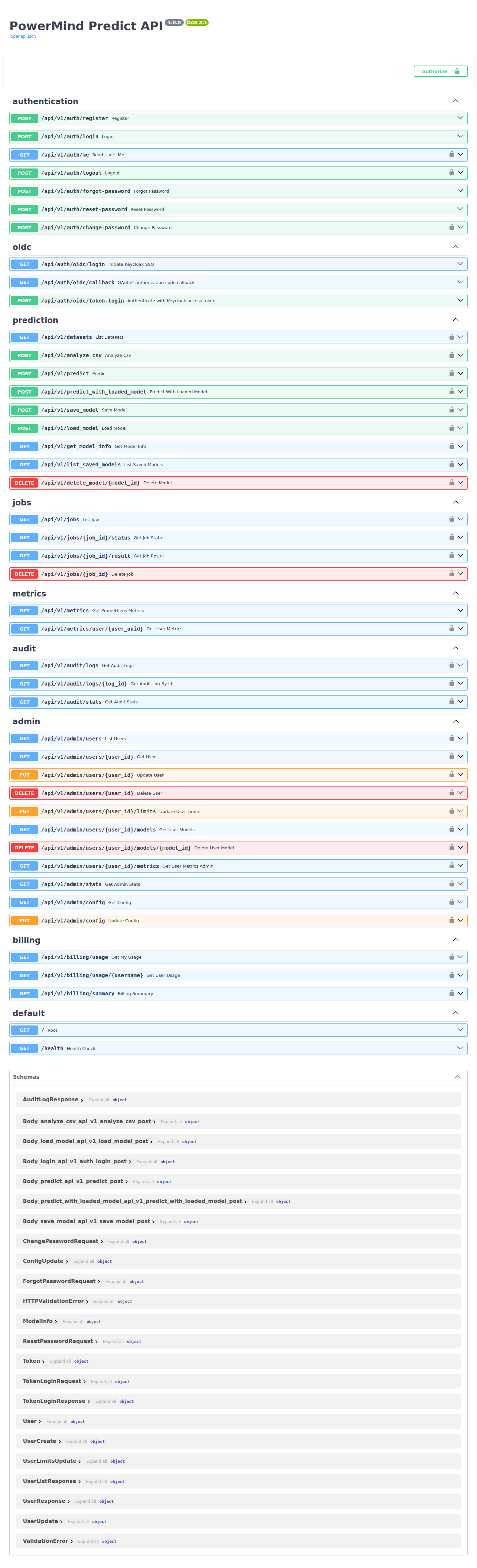
Typical user sequence
- Obtain an integration token from your PowerMind administrator and select Authorize.
POST /analyze_csv— inspect columns (also saves dataset metadata).POST /predict— multipart CSV + model/horizon →job_id.GET /jobs/{job_id}/statusuntil SUCCESS.GET /jobs/{job_id}/result— predictions, plot, rmse.- Optional:
POST /save_modelthenPOST /predict_with_loaded_model. GET /datasets— list uploaded CSVs.
Groups
| Area | Paths |
|---|---|
| Auth | /auth/register, /login, /logout, /me, /forgot-password, /reset-password, /change-password |
| Data | /analyze_csv, /datasets |
| Predict | /predict, /predict_with_loaded_model, /save_model, /load_model, /list_saved_models, /delete_model/{id} |
| Jobs | /jobs, /jobs/{id}/status, /jobs/{id}/result, DELETE /jobs/{id} |
| Admin | /admin/users, /admin/config, /admin/stats |
| Audit / billing | /audit/logs, /billing/usage, /billing/summary |
| Metrics / health | /metrics, /health |
Locks on Swagger rows mean you must Authorize first.