REST API — for integrators
If you use Studio, you can skip this page — Studio already calls these APIs.
Open /docs on the API host. After you have a token, click Authorize. Header on every later call: Authorization: Bearer <token>.
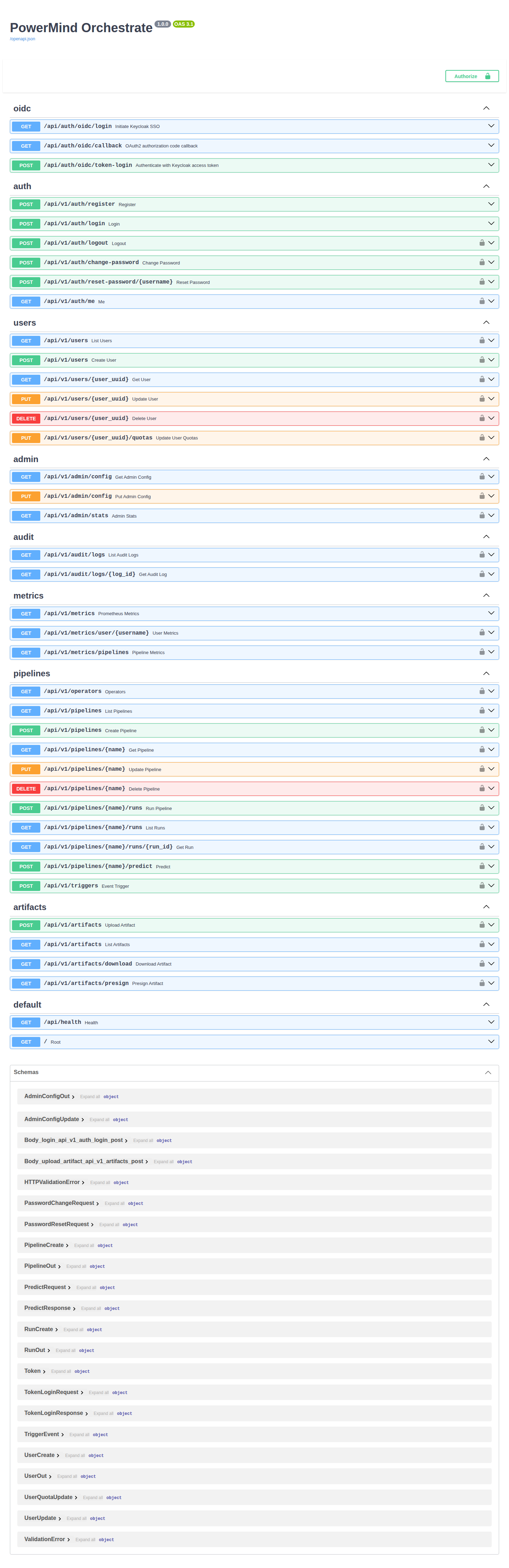
How to use it (short)
Same work as the UI, without the UI. Sign in once, then: create a pipeline → upload a CSV → start a run → wait until it succeeds → send new rows to predict.
Typical callers:
| Who | What they do |
|---|---|
| Studio | Uses your organization account, then calls the pipeline, run, prediction, and file APIs |
| Your own app or script | Uses an integration token supplied by your PowerMind administrator |
| Admin | Users, limits, audit, and metrics |
Happy path:
- Obtain an integration token from your PowerMind administrator.
POST /api/v1/pipelines— create the job.POST /api/v1/artifacts— upload the CSV (keep the returnedkey).POST /api/v1/pipelines/{name}/runs— start a run (pass that file key).GET /api/v1/pipelines/{name}/runs/{run_id}— poll until success.POST /api/v1/pipelines/{name}/predict— JSON rows withoutlabel.
CSV for train needs a label column. Predict columns must match the CSV.
Authentication
Send the token supplied for your integration as Authorization: Bearer <token>. PowerMind manages organization sign-in and identity-provider configuration.
All endpoints
Base: /api/v1 for the client API. Health has no token. Most other routes require a token. Admin means an Orchestrate client administrator.
Account
| Method | Path | Use |
|---|---|---|
| POST | /api/v1/auth/logout |
End the session |
| GET | /api/v1/auth/me |
Who am I |
| POST | /api/v1/auth/change-password |
Change own password |
| POST | /api/v1/auth/reset-password/{username} |
Reset a password (admin) |
Pipelines and runs
| Method | Path | Use |
|---|---|---|
| GET | /api/v1/operators |
List stages you can put in a pipeline |
| POST | /api/v1/pipelines |
Create a pipeline |
| GET | /api/v1/pipelines |
List your pipelines |
| GET | /api/v1/pipelines/{name} |
Get one pipeline |
| PUT | /api/v1/pipelines/{name} |
Update a pipeline |
| DELETE | /api/v1/pipelines/{name} |
Delete a pipeline |
| POST | /api/v1/pipelines/{name}/runs |
Start a run |
| GET | /api/v1/pipelines/{name}/runs |
List runs |
| GET | /api/v1/pipelines/{name}/runs/{run_id} |
One run (status) |
| POST | /api/v1/pipelines/{name}/predict |
Score new rows |
| POST | /api/v1/triggers |
Start a run from an event/trigger |
Files
| Method | Path | Use |
|---|---|---|
| POST | /api/v1/artifacts |
Upload a file (CSV, etc.) |
| GET | /api/v1/artifacts |
List your files |
| GET | /api/v1/artifacts/download |
Download by key |
| GET | /api/v1/artifacts/presign |
Short-lived download link |
Users (admin)
| Method | Path | Use |
|---|---|---|
| GET | /api/v1/users |
List users |
| POST | /api/v1/users |
Create a user |
| GET | /api/v1/users/{user_uuid} |
Get one user |
| PUT | /api/v1/users/{user_uuid} |
Update a user |
| PUT | /api/v1/users/{user_uuid}/quotas |
Set storage / rate / file-size limits |
| DELETE | /api/v1/users/{user_uuid} |
Delete a user |
Admin, audit, metrics
| Method | Path | Use |
|---|---|---|
| GET | /api/v1/admin/config |
Default limits (admin) |
| PUT | /api/v1/admin/config |
Update default limits (admin) |
| GET | /api/v1/admin/stats |
Counts / usage (admin) |
| GET | /api/v1/audit/logs |
Search audit (admin) |
| GET | /api/v1/audit/logs/{log_id} |
One audit row (admin) |
| GET | /api/v1/metrics |
Platform metrics (Prometheus text) |
| GET | /api/v1/metrics/user/{username} |
Usage for one user |
| GET | /api/v1/metrics/pipelines |
Pipeline run stats |
Health
| Method | Path | Use |
|---|---|---|
| GET | / |
Redirect / root |
| GET | /api/health |
Is the service up |
Locks on Swagger rows mean you must Authorize first.