PowerMind FeatureHub User Guide - Feature Design
Designing the right feature view requires understanding the structure of your raw source data and choosing the appropriate feature types. This guide explains how to select keys, configure timestamps, choose feature types, and write derived expressions.
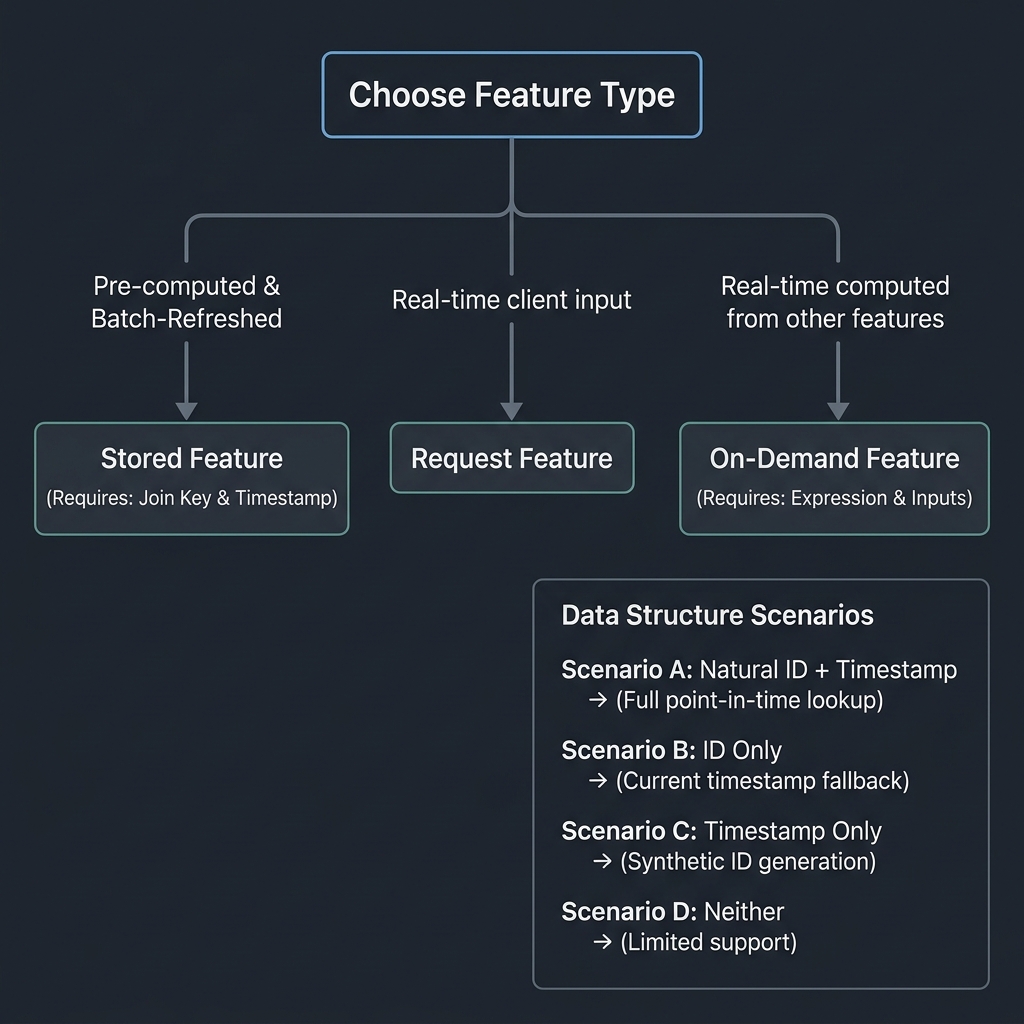
Feature Design Decision Tree
The following diagram illustrates the decision tree for choosing the correct feature type and handling different raw data structures:
1. Unified Hybrid Feature Model
FeatureHub uses a unified, hybrid feature model where all registered features are Stored Features:
- Offline Materialization: Features are pre-computed in batch from the datasource and materialized to Redis for sub-millisecond online lookups.
- Dynamic Serving Overrides (Hybrid Serving): At serving time, you can override any feature or intermediate inputs by passing values in the request_features dictionary. FeatureHub dynamically recalculates all dependent scaling and derived features on-the-fly.
This unifies all feature computations into a single, cohesive stored feature mechanism with dynamic serving overrides.
2. Data Scenarios and Strategies
Feature fields are often optional, but the fields you must provide depend entirely on the contents of your raw datasource.
Scenario A: Natural ID + Timestamp (BEST)
- Data Structure: Rows contain a clear identifier (e.g.,
customer_id) and an event timestamp (e.g.,created_at). - Strategy: Provide both
join_keyandevent_timestamp_column. - Outcome: Full functionality. You get accurate point-in-time lookups (preventing data leakage during training), offline historical training sets, and fast online lookups.
Scenario B: Natural ID Only, No Timestamp (PARTIAL)
- Data Structure: Rows have a unique key but no timestamp column (e.g., a static customer profile table).
- Strategy: Provide
join_key, and setevent_timestamp_columnto null (or omit). - Outcome: Entity-based lookups work, but FeatureHub assigns the current timestamp (
NOW()) to all rows. Historical offline analysis will not be point-in-time accurate.
Scenario C: No ID, Has Timestamp (PARTIAL)
- Data Structure: Raw time-series events without a primary identifier column.
- Strategy: Omit
join_key, and provideevent_timestamp_column. - Outcome: FeatureHub auto-generates a synthetic join key named
__fh_entity_id(a hash of all data columns). You must save and use this synthetic ID to retrieve features later.
Scenario D: Neither ID Nor Timestamp (DIFFICULT)
- Data Structure: A simple flat list of records without unique keys or event times.
- Strategy: Omit both fields.
- Outcome: FeatureHub uses synthetic IDs and fallbacks to the current time, making materialization and online lookups highly problematic.
3. Writing Derived Expressions & Scaling
You can write expressions to calculate features at ingest time (offline) or dynamically at prediction time (using serving-time overrides).
Syntax Rules
Derived expressions should follow standard database functions:
- Reference other columns by their raw name.
- Explicitly set the data type using the format: expression : dtype (e.g. col1 + col2 : float64).
- Supported data types: string, int64, float64, bool.
Example Expressions
- Safe Division: Avoid division-by-zero errors by using
nullif: - Conditional Flags: Generate boolean flags:
- Null Handling: Use
coalesceto provide default fallback values:
Scaling and Standardization Helper (scale)
FeatureHub provides a built-in scale() function that simplifies feature normalization, standardization, and custom scaling:
- Arguments:
value: The column name or feature to scale.mode:'auto'(default),'standardize', or'min_max'.'auto': Standardizes using datasetmeanandstdif available, otherwise scales usingminandmaxnormalization.'standardize': Performs Z-score standardization:(x - mean) / std.'min_max': Performs Min-Max normalization:(x - min) / (max - min).
-
mean,std,min_val,max_val: Optional overrides. If provided, they override the automatically computed dataset statistics. -
Examples:
Categorical Encoders (one_hot_encode, ordinal_encode)
To handle categorical columns at serving and ingestion time, FeatureHub provides built-in encoding functions:
- One-Hot Encoding (
one_hot_encode): Converts a categorical column value into a list (or array in SQL) of binary indicators. - Syntax:
one_hot_encode(value, category1, category2, ...) -
Example:
one_hot_encode(device_type, 'desktop', 'mobile', 'tablet')- If
device_typeis'mobile', it yields[0.0, 1.0, 0.0].
- If
-
Ordinal Encoding (
ordinal_encode): Maps a categorical string value to a zero-indexed integer category based on a supplied ordered list. Returns-1if the value is null or not found in the list. - Syntax:
ordinal_encode(value, category1, category2, ...) - Example:
ordinal_encode(risk_level, 'low', 'medium', 'high') : int64- If
risk_levelis'high', it returns2. - If
risk_levelis'unknown', it returns-1.
- If
Explicit Scaling Helpers (standardize, min_max_scale)
Apart from the unified scale() helper, you can call specific transformations directly:
- Standardize: Performs standard Z-score scaling using calculated dataset statistics.
* Syntax: standardize(feature_name) : float64
- Min-Max Scale: Performs min-max scaling to shift and rescale features to range $[0.0, 1.0]$.
* Syntax: min_max_scale(feature_name) : float64
General Utility & Math Functions
You can also use typical database functions in your derived expressions:
- nullif(value, other): Returns None if value == other, otherwise returns value (essential for preventing division-by-zero: spend / nullif(clicks, 0)).
- coalesce(*values): Returns the first non-null argument.
- abs(value): Returns the absolute value of the numeric expression.
- max(*values) / min(*values): Returns the maximum/minimum non-null value among the arguments.
4. Helper Endpoints for Guidance
If you are programmatically creating features or need instant reference details, FeatureHub exposes several helpful endpoints:
- GET /api/v1/schema-guide/feature-view-requirements - Returns required fields and rules.
- GET /api/v1/schema-guide/datasource-strategies - Explains behavior based on what ID/timestamp columns you have.
- GET /api/v1/schema-guide/feature-types-guide - Guide on the unified hybrid feature model.
- GET /api/v1/schema-guide/scaling-guide - Documentation and examples for the scale() function.
- GET /api/v1/schema-guide/workflow-checklist - Walkthrough checklist from preparation to serving.